Otterflo

Now in early access

Files, tools
and agents,
in one place.

A shared workspace for your team and every agent. Agents work with your access, and every change can be undone.

The Otterflo workbench for the Northwind workspace. The file tree shows team folders for marketing, sales, customer data, development and customer success. In the chat, Priya asks which accounts are likely to churn this month, and Claude Code, working for her, has queried the prod database read-only and is filling the Health column of customer tracking.xlsx, shown open beside it with five changes to keep or rewind.

How it works

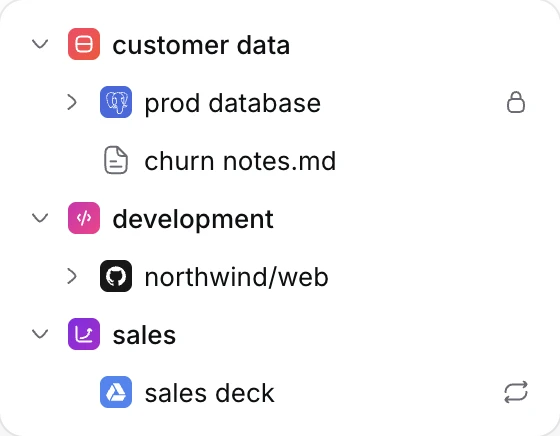
  1. A file tree with team folders: customer data holds a read-only prod database and churn notes.md, development holds the northwind/web repository, and sales holds a synced sales deck.

    1Bring your files and tools

    Give each team a folder. Databases, repos and drives you connect show up inside it.

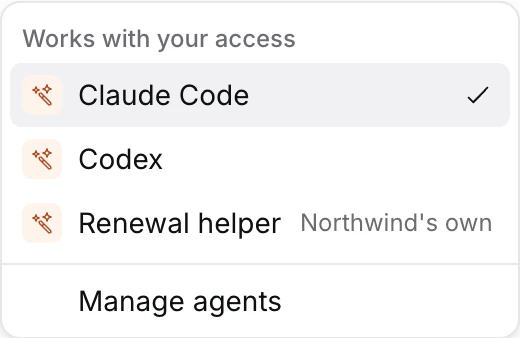
  2. A message: Which accounts might churn?An agent picker headed Works with your access, with Claude Code selected, then Codex and Renewal helper, Northwind's own agent, and Manage agents.

    2Ask any agent

    Claude Code, Codex, ChatGPT or your own. Each one works with your access.

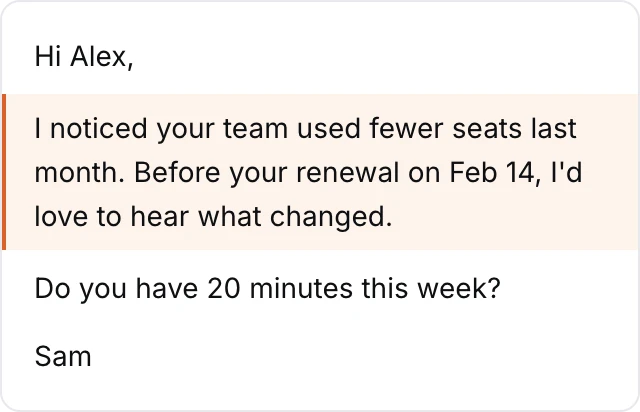
  3. An email draft to Alex in which the agent's new sentence about fewer seats and the renewal on Feb 14 is highlighted.A bar reading 1 change, with Rewind and Keep buttons.

    3Keep it or rewind it

    What an agent changed stays marked until someone keeps it. Rewind puts it back.

Works with your agents

Use the agents your team already knows, or one you built. Each works with the access of the person who asked.

  • Claude Code
  • Codex
  • ChatGPT
  • Your own
Your workspace
claude mcp add --transport http otterflo https://otterflo.com/mcp

One line in Claude Code. Other agents connect from their MCP settings.

Safe by design

Agents never get more than the person who asked, and anything risky waits for a yes.

Asks before it acts

Choose what agents may do on their own. Everything else waits for someone to say yes.

Claude Code, working for Priya, has drafted 3 check-in emails and is waiting for Priya before it sends them. An approval card asks: Send 3 check-in emails? From Priya's Gmail, where sending is set to Ask, with a link to read the drafts and Deny, Always allow and Allow once buttons.

Your access, nothing more

An agent can open what the person who asked can open. No shared passwords.

What Claude Code, working for Priya, can open: customer data, can edit; prod database, read-only; finance, no access.

Private data stays masked

Emails, card numbers and other private fields reach agents masked.

Rows from the customers table of the prod database, marked Masked: the account names show, while email addresses and card numbers are masked except for a few characters.

A name on every change

Who changed what, and for whom. Rewind any of it.

The history of customer tracking.xlsx: Claude Code for Priya changed 5 cells now, Priya changed the renewal dates, with a Rewind button, Codex for Dana changed 3 rows on Friday, and Sam created the sheet on Monday.

Your tools stay where they live

Connect a database, a repo or a drive and it shows up as a folder. Nothing is copied. A production database is read through a runner inside your own network.

Three connections, a read-only prod database on Postgres, the northwind/web repository on GitHub and a Sales drive on Google Drive, are mounted, not copied, into the Northwind workspace's file tree, where they appear inside the customer data, development and sales folders.

Everywhere you work

One workspace in the browser, on your computer and on your phone. The web app comes first.

Otterflo in a browser tab at otterflo.com/northwind, with the Files panel and a chat where Claude Code, working for Priya, waits to send 3 emails.

Web

The whole workbench in a browser tab. Nothing to install.

A file window with Northwind in its Locations list, showing the workspace's folders: customer data, customer success, development, marketing and sales.

DesktopComing soon

Mounts the workspace as a folder, so every app on your computer can open it.
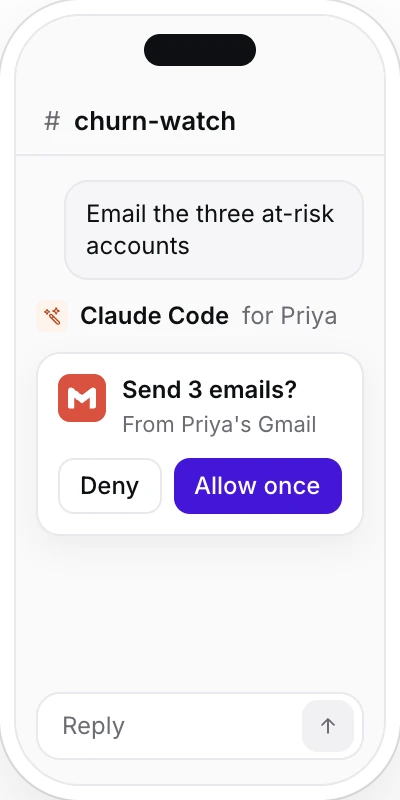
A phone showing the churn-watch channel, where Claude Code, working for Priya, asks: Send 3 emails? From Priya's Gmail, with Deny and Allow once buttons.

PhoneComing soon

Follow agents and answer approvals wherever you are.

Pricing

Free to run yourself. Our cloud is in early access.

  • Community

    Free

    The whole workspace, on your own servers.

    • Team folders, chats and channels
    • Any agent, with your access
    • Approvals, Keep and Rewind
  • Cloud

    Early access

    We run it for you. Join the waitlist.

    Join the waitlist
    • Everything in Community
    • Hosted, updated and backed up
    • Desktop and phone apps as they ship
    • Pricing shared before launch
  • Enterprise

    Custom

    For larger teams with their own rules.

    Talk to us
    • Everything in Cloud
    • Self-hosted or private cloud
    • Enterprise features, commercial license
    • Help from the people who build it

Questions

Which agents can I use?

Claude Code, Codex and ChatGPT connect through MCP, and so can agents you build. Each one works with the access of the person who asked, so it sees what they can see and nothing else.

Does Otterflo copy our data?

Nothing is copied. Connect a database, a repo or a drive and it shows up as a folder. A production database is read through a runner inside your own network.

What if an agent gets something wrong?

What an agent changed stays marked until someone keeps it. Rewind puts it back.

Can we host it ourselves?

The whole workspace, on your own servers.

When can my team start?

Free to run yourself. Our cloud is in early access. Join the waitlist.

Ask it.
Check it.
Keep it.